Professional Portrait Retouching Course
Categories: Photography, Photoshop
Wishlist Share

About Course

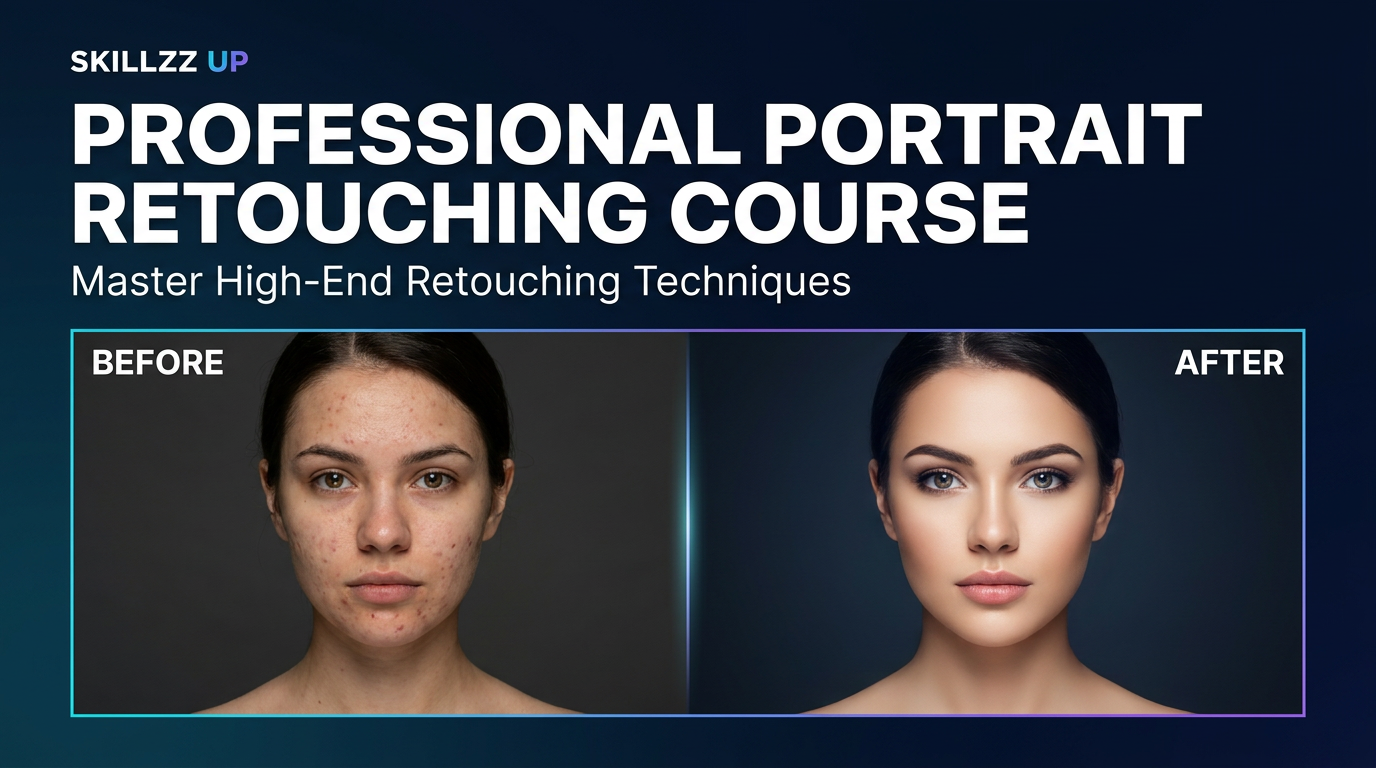
This course teaches the practical, professional-level Photoshop skills used to transform studio portrait captures into polished, client-ready final images. Rather than covering Photoshop in the abstract, every technique is taught directly on real studio portrait samples, so you’re learning the exact workflow professional retouchers use on paid client work — not a simplified demo version.

You’ll learn how to approach skin retouching without over-smoothing or losing natural texture, how to identify and correct common blemishes and imperfections cleanly, and how to refine tone, color, and contrast so the final image looks balanced and true to life. The course also covers detail work — eyes, hair flyaways, stray marks — the kind of fine-tuning that separates an amateur edit from a professional one, along with an efficient, repeatable workflow you can apply consistently across a full shoot rather than editing every image from scratch.

By the end of the course, you’ll be able to take a raw studio portrait and confidently retouch it to a professional standard — whether that’s for your own photography clients, as a freelance retouching service, or simply to sharpen your Photoshop editing skills.

Who this course is for: photographers who want to offer retouching as part of their service, aspiring or working retouchers looking to formalize their skills, and Photoshop users who already know the basics and want to move into portrait-specific, client-ready editing.

What you’ll need: Adobe Photoshop and a basic familiarity with its interface — this course focuses on retouching technique rather than teaching Photoshop from scratch.


Show More

What Will You Learn?

  • This course teaches the practical, professional-level Photoshop skills used to transform studio portrait captures into polished, client-ready final images. Rather than covering Photoshop in the abstract, every technique is taught directly on real studio portrait samples, so you're learning the exact workflow professional retouchers use on paid client work — not a simplified demo version.
  • You'll learn how to approach skin retouching without over-smoothing or losing natural texture, how to identify and correct common blemishes and imperfections cleanly, and how to refine tone, color, and contrast so the final image looks balanced and true to life. The course also covers detail work — eyes, hair flyaways, stray marks — the kind of fine-tuning that separates an amateur edit from a professional one, along with an efficient, repeatable workflow you can apply consistently across a full shoot rather than editing every image from scratch.
  • By the end of the course, you'll be able to take a raw studio portrait and confidently retouch it to a professional standard — whether that's for your own photography clients, as a freelance retouching service, or simply to sharpen your Photoshop editing skills.

Course Content

1.Introduction To The Course
Take your portrait photography to the next level with a practical, step-by-step retouching course designed to teach you the techniques used to create clean, natural, and professional-looking images. From basic blemish removal to advanced techniques such as frequency separation, Dodge & Burn, colour grading, and sharpening, you'll learn how each stage contributes to a polished final image. By the end of the course, you'll understand not only how to retouch, but also why each technique is used and how to apply it without losing the natural character of your subject.

  • Introduction To The Course
    00:18

2. Retouching Tools
A practical introduction to the essential tools used in professional portrait retouching. Learn how to select and use the right Photoshop tools for cleaning, enhancing, correcting, and refining images while maintaining realistic skin texture and detail.

3. Blemish Removal
Learn professional techniques for removing temporary blemishes, spots, pimples, and other distractions from the skin. The session focuses on achieving clean, polished skin while preserving the subject's natural texture and features.

4. Frequency Separation
A detailed introduction to frequency separation, a powerful technique for separating skin texture from colour and tone. Learn how to correct uneven skin tones, smooth problematic areas, and refine skin while retaining natural texture and detail.

5. Dodge & Burn
Learn how to use Dodge & Burn to shape light, improve skin tones, and enhance facial structure. This session demonstrates how subtle adjustments to highlights and shadows can create depth, dimension, and a more polished professional portrait.

6. Colour Grading
Discover how to enhance the mood, and visual identity of your photographs through colour grading. Learn how to balance skin tones, refine colours, and create a cohesive cinematic or professional look without compromising natural skin colour.

7. Sharpening
Learn the correct approach to sharpening a retouched image for maximum clarity and detail. This session covers how to enhance important features and textures while avoiding excessive sharpening, halos, and an unnatural appearance.

8. Complete Retouching Workflow
Put everything together in a complete professional retouching workflow. Follow the process from the initial image through skin cleanup, frequency separation, Dodge & Burn, colour grading, sharpening, and final adjustments to produce a polished, publication-ready portrait.

Student Ratings & Reviews

No Review Yet
No Review Yet